
Grocery Store POS Software Built for Faster Checkout and Smoother Operations
Replace slow, outdated grocery equipment with a modern POS system that connects checkout, payments, purchasing, inventory, pricing, customer marketing, and department operations.
Acadia POS gives grocery stores the technology needed to manage the front end, back office, deli, meat department, seafood counter, and storewide pricing through one connected platform.
Qualifying grocery stores can receive up to 25 complete checkout lanes with $0 upfront hardware cost, along with white-glove installation, employee training, and ongoing support.
[Request a Grocery Store POS Consultation]
Stop Letting Outdated Equipment Slow Down Your Store
Legacy grocery POS systems create problems that affect customers, employees, and profitability.
Slow registers create longer lines. Proprietary equipment makes repairs expensive. Manual price changes consume employee hours. Disconnected scales create pricing mistakes. Low-stock reports fail to turn into actionable purchase orders. Customer purchase data sits unused while shoppers quietly stop returning.
Acadia POS replaces those disconnected systems with one modern grocery-store platform.
Use it to manage:
- Checkout lanes
- Payment terminals
- Product pricing
- Inventory
- Purchase orders
- Suppliers and brands
- Stores and warehouse locations
- Customer purchasing history
- Digital menu boards
- Text-message marketing
- Automated win-back campaigns
- Deli, meat, and seafood scales
- Electronic shelf labels
- Promotions and reporting
Your employees get a system they can learn quickly. Your managers gain better visibility and control. Your customers get a faster, more consistent shopping experience.
Get Up to 25 Checkout Lanes With $0 Upfront Hardware Cost
Qualifying grocery stores can receive up to 25 complete checkout lanes with $0 upfront hardware cost.
Your approved configuration may include:
- Touchscreen POS computers
- Customer-facing displays
- PAX payment terminals
- Thermal receipt printers
- Cash drawers
- Zebra scanner scales
- Mounting poles and brackets
- Connecting cables
- Network equipment
You pay a monthly software fee for each lane and own the qualifying hardware after 16 months.
This allows your store to replace aging checkout equipment without absorbing a massive upfront capital expense.
Equipment quantities, configurations, and approval depend on eligibility and your store’s operational requirements.
[See If Your Grocery Store Qualifies]
Faster, More Reliable Payment Hardware
Acadia POS uses widely available PAX payment devices instead of locking grocery stores into obscure proprietary terminals that only one dealer can supply or service.
Depending on local inventory, dealer availability, location, and shipping cutoff times, replacement devices may be available through:
- Local pickup
- Same-day local delivery
- Overnight shipping
- One or two-business-day shipping
Many fixed-location PAX terminals use straightforward power and Ethernet connections.
Replacing a terminal may involve:
- Disconnecting the existing power and network cables.
- Removing the device from its bracket.
- Installing the replacement terminal.
- Reconnecting the existing cables.
- Entering the supplied registration or activation code.
In many cases, a manager or employee who can handle basic cable connections can complete the physical replacement without waiting for an onsite technician.
Acadia can then assist with device registration, activation, and configuration.
Same-day and expedited replacements depend on equipment availability, dealer inventory, location, order timing, and carrier service.
Payment Pricing Options for Thin-Margin Grocery Stores
Small changes in payment costs can materially affect a grocery store operating on thin margins.
Acadia can support several payment-pricing models, including:
- Traditional merchant-paid processing
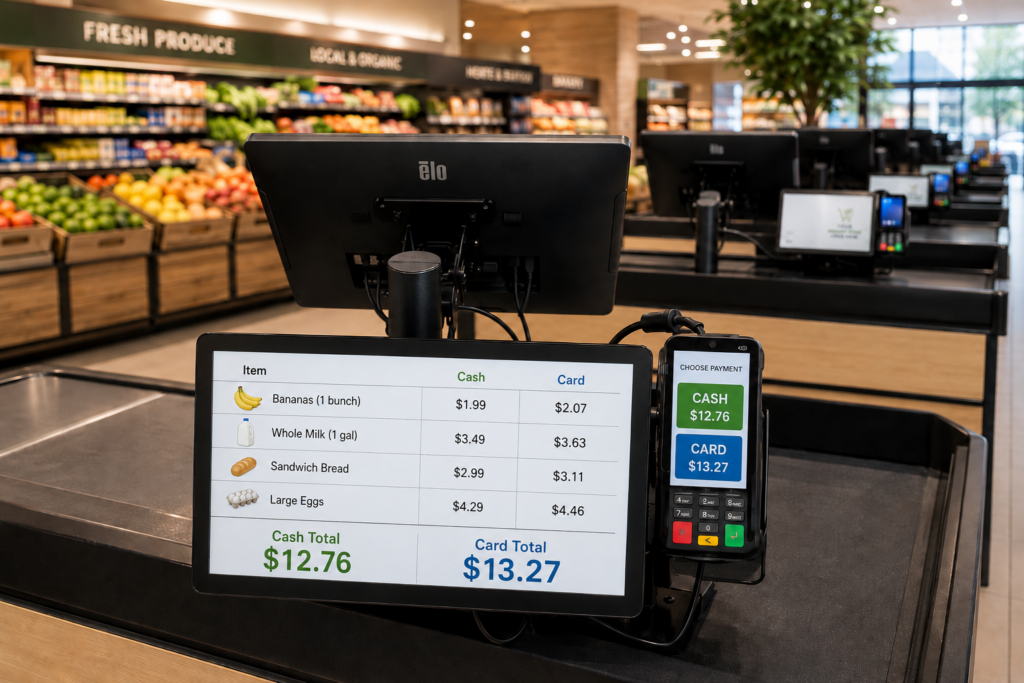
- Dual pricing
- Cash-discount configurations
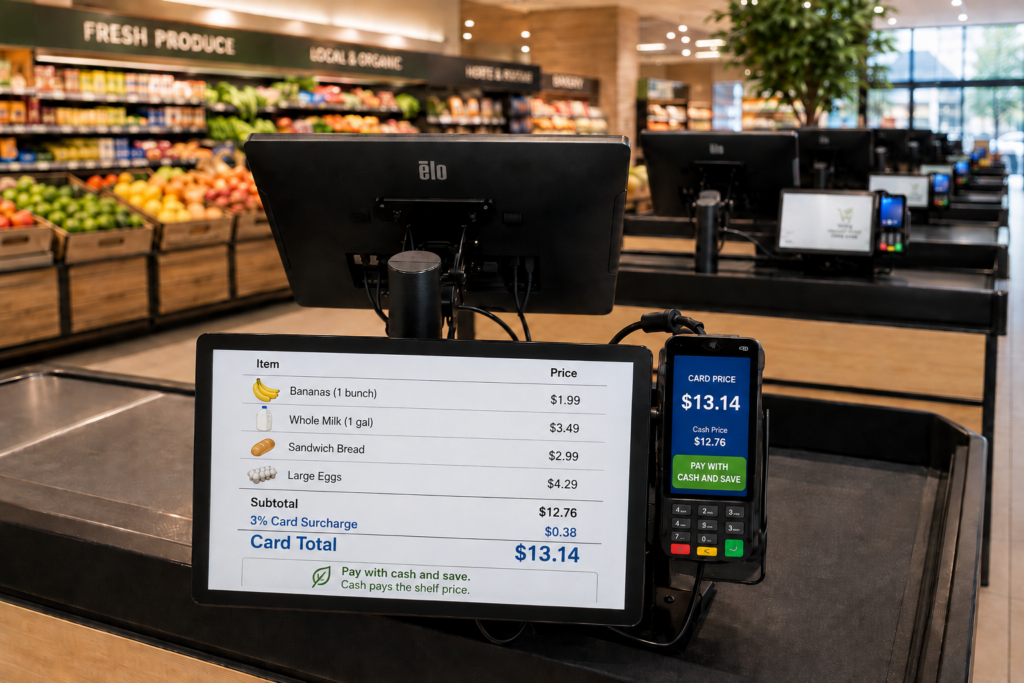
- Credit-card surcharging where permitted
The right model depends on your location, customer base, card mix, pricing strategy, and operational preferences.
Why Grocery Stores Often Prefer Credit-Card Surcharging
A full dual-pricing program can create logistical problems for grocery stores.
When thousands of prices appear on shelves, refrigerated cases, produce displays, deli signs, advertisements, and promotional materials, displaying two prices for every product can require extensive retagging.
For many grocery stores, a clearly disclosed credit-card surcharge offers a practical middle ground.
The store maintains one shelf price and applies an additional charge when a customer chooses to pay by credit card. Customers who prefer to avoid the surcharge can use cash or debit.
This preserves customer choice:
- Customers who want points, rewards, or airline miles can choose credit.
- Customers who want the no-surcharge option can choose cash or debit.
- The store continues absorbing the applicable cost of debit-card transactions.
- Credit-card users cover some or all of the additional expense associated with their chosen payment method.
A surcharge is a cost-recovery strategy, not free revenue. Applicable laws, card-network rules, disclosure requirements, and surcharge limits must be followed.
Clear Customer Disclosure
A compliant surcharge program may require clear disclosure:
- At the store entrance
- At or near the checkout area
- Before payment authorization
- As a separate amount on the customer’s receipt
Acadia can help configure the POS to apply the approved charge to eligible credit-card transactions while excluding debit and prepaid transactions.
Recover More of Your Payment-Acceptance Costs
A properly configured credit-card surcharge can offset a substantial portion of eligible credit-card processing costs while preserving a no-surcharge payment option for customers.
The actual savings depend on:
- Total monthly sales
- Percentage of customers using eligible credit cards
- Debit and cash volume
- Refunds
- Card mix
Acadia works with the merchant and payment provider to select and configure the appropriate payment-pricing model.
Real-Time Grocery Inventory Management
Acadia POS connects sales activity with inventory reporting.
When products sell, the system can update inventory and help managers identify:
- Fast-moving products
- Slow-moving products
- Low-stock items
- Department performance
- Purchasing patterns
- Product-level sales
- Weighted inventory movement
- Promotion results
- Inventory by store or warehouse
Better inventory visibility helps reduce overordering, stockouts, spoilage, and unnecessary waste.
Managers can make purchasing decisions based on current sales and inventory data instead of relying on guesswork or outdated spreadsheets.
Built-In Purchase Orders, Suppliers, and Receiving
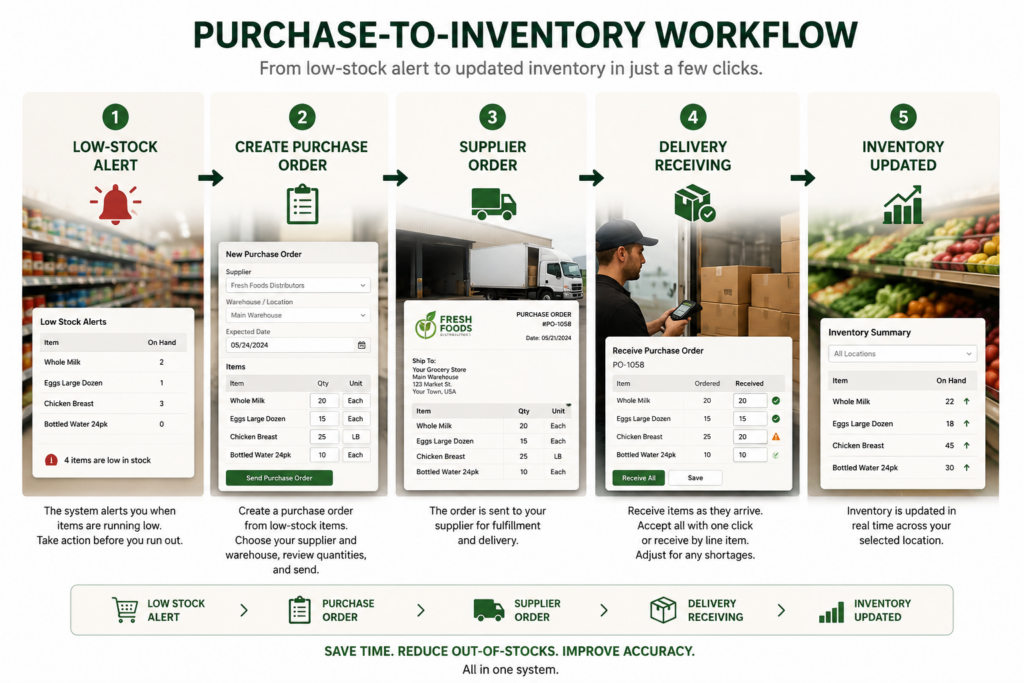
Low-stock alerts only help when your team can act on them quickly.
Acadia POS allows grocery stores to turn inventory information into purchase orders without leaving the system or rebuilding orders in spreadsheets.
Managers can:
- Review low-stock products
- Generate a purchase order from those items
- Select the appropriate supplier
- Organize products by brand
- Assign the receiving store or warehouse
- Adjust quantities before submitting the order
- Send the purchase order to the supplier
- Track products that have been ordered but not yet received
This creates a direct path from low-stock alert to replenishment.
Receive Inventory Individually or All at Once
When an order arrives, employees can receive inventory based on what was actually delivered.
Your team can:
- Check in products one line at a time
- Record partial deliveries
- Confirm adjusted quantities
- Identify missing products
- Receive the entire purchase order with one click
- Add accepted products to the appropriate inventory location
Once products are received, the POS adds the accepted quantities to inventory at the selected store or warehouse.
This eliminates duplicate data entry and reduces the chance that employees physically receive merchandise without updating inventory records.
Manage Multiple Suppliers, Brands, and Locations
Use supplier and location records to manage:
- Grocery distributors
- Produce suppliers
- Meat and seafood vendors
- Beverage distributors
- Local brands
- Specialty-food suppliers
- Individual grocery-store locations
- Back-room inventory
- Central warehouses
- Department-specific storage areas
A multi-location grocery business can order products for a specific store or receive products into a central warehouse before transferring them to another location.
The workflow becomes:
Low-stock alert → Purchase order → Supplier → Delivery → Receiving → Updated inventory
Your team spends less time entering the same information into multiple systems and more time keeping shelves stocked.
Digital Menu Boards That Help Move Perishable Inventory
Fresh inventory loses value every hour it remains unsold.
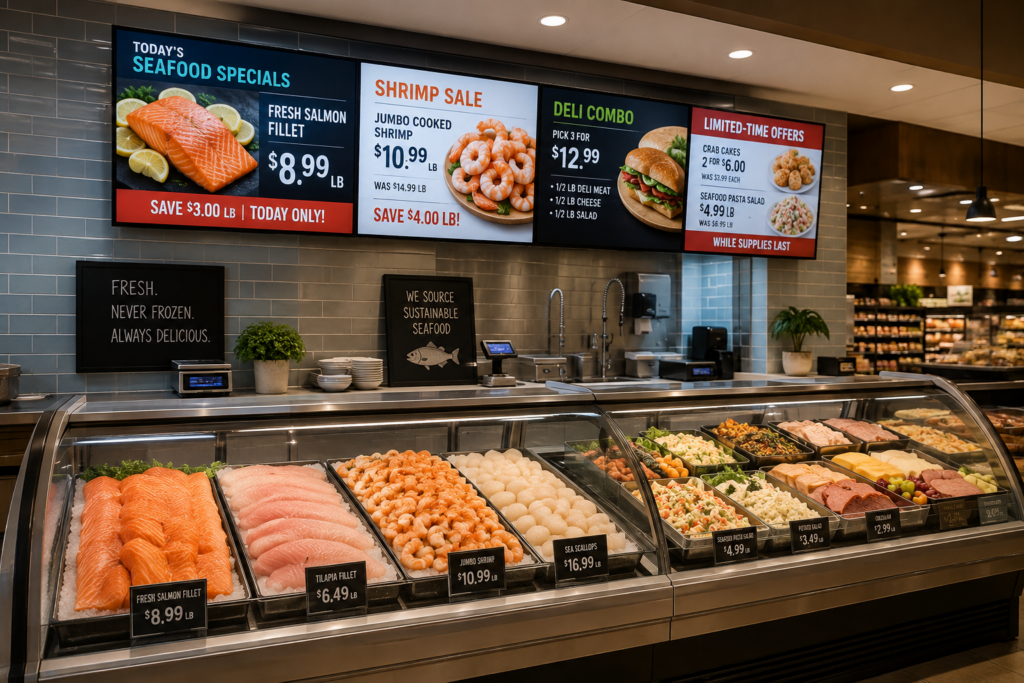
Use digital menu boards to promote products that need immediate attention, including:
- Meat and seafood specials
- Deli combinations
- Prepared foods
- Bakery promotions
- Produce markdowns
- Short-dated inventory
- Excess stock
- Seasonal items
- High-margin products
Managers can change promotions without printing and hanging new signs throughout the store.
A seafood department can advertise a same-day salmon special. A deli can promote prepared meals before the dinner rush. A produce manager can quickly discount excess inventory before it becomes waste.
The Acadia digital menu board software is included without an additional platform fee. Compatible televisions, screens, mounting equipment, and installation hardware may still be required.
Digital boards can help you:
- Update advertised prices quickly
- Highlight daily and weekly specials
- Promote department-specific products
- Move perishable inventory
- Reduce printed signage
- Improve the appearance of service counters
- Feature high-margin items
- Display store announcements
Automated Customer Marketing Based on Purchase Habits
Most grocery stores collect valuable purchasing data and then fail to use it.
Acadia POS can use transaction history to help your store create more relevant customer campaigns.
Segment customers based on:
- Previous purchases
- Favorite departments or product categories
- Total spending
- Shopping location
- Customer category
- Date of last transaction
- Frequency of visits
- Purchase habits
Instead of sending every customer the same generic coupon, you can target shoppers according to what they actually buy.
A customer who regularly purchases seafood can receive a seafood promotion.
A deli customer can receive an offer for prepared meals.
A customer who buys premium meat can receive an upcoming butcher-counter special.
This turns transaction history into repeat business instead of leaving valuable information buried inside a report.
Automatic Win-Back Campaigns
Acadia POS can automatically identify customers who have stopped visiting and place them into win-back campaigns.
Campaign timing can include customers who have not returned in:
- Seven days
- 30 days
- 60 days
- 90 days
The campaigns can use actual purchase history instead of sending every inactive customer the same message.
For example, a customer who regularly buys seafood but has not visited in 30 days could receive a seafood promotion. A customer who frequently purchases deli meals could receive an offer related to prepared foods.
The system handles the customer segmentation automatically, helping your store reconnect with shoppers without requiring employees to manually review customer reports.
Free Marketing Platform and Campaign Tools
The Acadia marketing platform includes:
- Campaign-building tools
- Customer segmentation
- Automated win-back campaigns
- AI-generated promotional content
- AI-generated landing pages
- Image uploads
- Image storage
- Promotional page hosting
There is no additional platform fee to access these tools or build campaigns.
Text-message delivery is usage-based, so message-delivery charges apply when your store sends texts.
You control:
- Who receives each campaign
- When the campaign is sent
- Which products or departments it promotes
- What landing page the customer sees
- Which customer behavior triggers the campaign
This gives independent grocery stores access to marketing automation that would otherwise require multiple outside platforms.
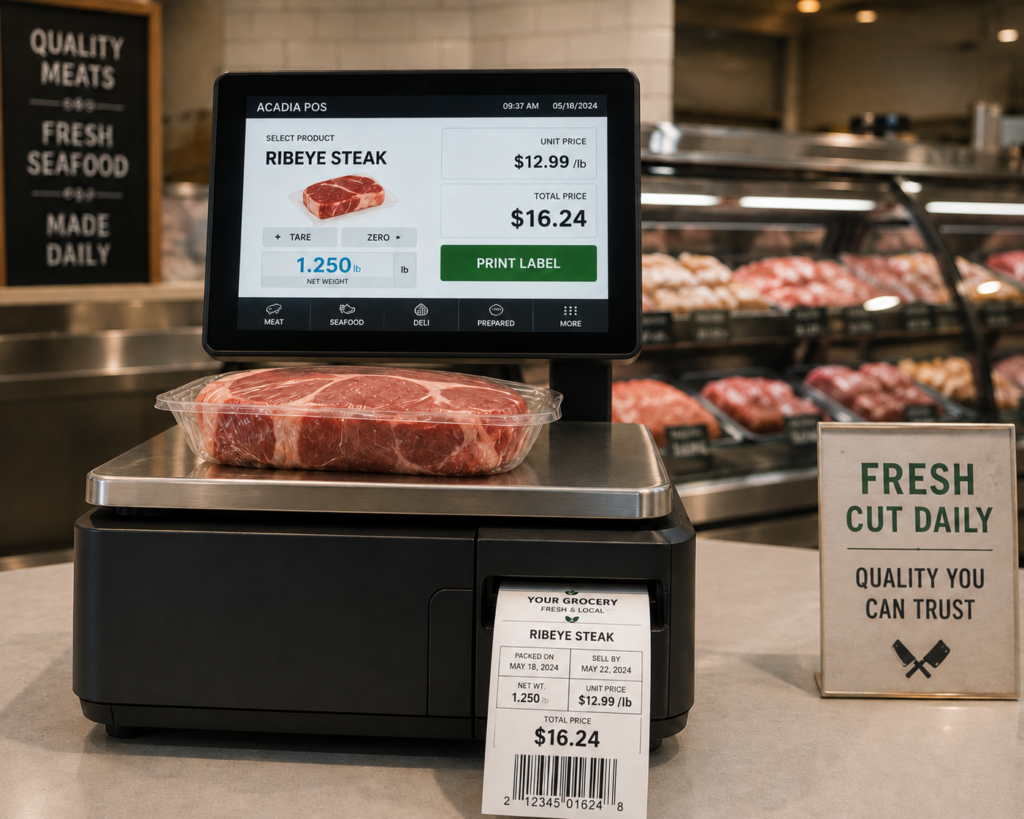
Integrated Scales for Meat, Deli, and Seafood Departments
Optional integrated scales help weight-based departments prepare and price products accurately.
An employee can:
- Place the product on the scale.
- Select the correct item.
- Calculate the weight and selling price.
- Print a scannable label.
- Attach the label to the package.
- Send the item to checkout.
The cashier scans the label instead of manually entering the product, weight, or price.
This helps your store:
- Reduce manual-entry mistakes
- Speed up checkout
- Apply consistent pricing
- Track weighted products
- Remove sold quantities from inventory
- Improve department reporting
- Reduce duplicate data entry
These scales work well for:
- Meat departments
- Seafood counters
- Delis
- Prepared-food departments
- Cheese counters
- Produce sold by weight
- Specialty markets
The department handles the product information when preparing and labeling the package. The cashier simply scans it at checkout.
Electronic Shelf Labels That Update With Your POS
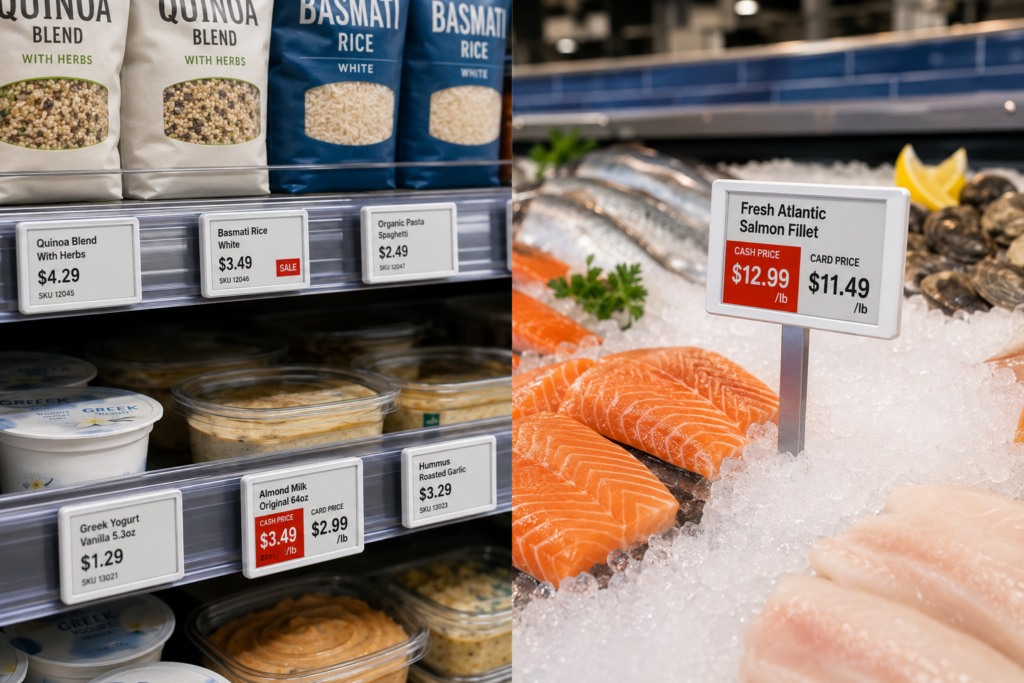
Changing thousands of paper shelf tags wastes employee hours and creates opportunities for pricing discrepancies.
Optional electronic shelf labels allow stores to update product and pricing information electronically.
Use them to:
- Change prices faster
- Launch promotions immediately
- Reduce shelf-to-register pricing discrepancies
- Display cash and card pricing when appropriate
- Update product information
- Manage supplier cost changes
- Coordinate pricing across multiple locations
- Reduce repetitive manual labor
Magnetic electronic labels can attach to compatible steel shelves.
Spike-style or ice-pick mounts can display digital prices inside seafood and fresh-food ice displays.
Electronic shelf labels and required mounting accessories are available for purchase.
For grocery stores managing thousands of products, frequent supplier cost changes, and weekly promotions, electronic labels can eliminate hours of manual price-tag replacement.
Reporting That Helps Managers Make Better Decisions
Acadia POS gives grocery-store managers access to reporting across sales, products, inventory, customers, purchasing, and departments.
Reports can help identify:
- Best-selling products
- Slow-moving inventory
- Low-stock products
- Sales by department
- Sales by location
- Employee activity
- Customer purchasing patterns
- Promotion performance
- Supplier purchasing history
- Received and outstanding purchase orders
- Inventory movement
- Weighted-product sales
- Payment-method trends
The goal is not to bury managers in reports.
The goal is to give them useful information they can act on.
Built for Independent Grocery Stores and Multi-Department Markets
Acadia POS can support:
- Independent grocery stores
- Neighborhood markets
- Specialty food stores
- International markets
- Meat markets
- Seafood markets
- Delis
- Produce markets
- Convenience-oriented grocery stores
- Multi-location grocery businesses
Your system can be configured around your departments, checkout volume, payment strategy, inventory structure, and operational needs.
You do not have to force your business into a generic retail setup.
White-Glove Installation and Onboarding
Replacing a grocery-store POS system can sound disruptive.
Our job is to make the transition smooth.
Acadia provides white-glove onboarding that covers the entire process, from planning and configuration through installation, training, and launch.
1. Store and Workflow Review
We start by learning how your operation currently works.
We review:
- Number of checkout lanes
- Store departments
- Product catalog
- Existing equipment
- Payment requirements
- Scales and weighted products
- Suppliers and brands
- Purchasing workflows
- Stores and warehouse locations
- Inventory needs
- Customer marketing
- Reporting requirements
- Digital signage
- Electronic shelf labels
We build the implementation around your business rather than forcing your store into a generic template.
2. System Configuration
Our team configures your POS before installation.
This may include:
- Product database setup
- Department creation
- Pricing
- Tax settings
- User permissions
- Payment devices
- Receipt settings
- Suppliers and brands
- Store and warehouse locations
- Purchase-order workflows
- Scales
- Inventory rules
- Customer groups
- Marketing campaigns
- Digital menu boards
Preparing the system in advance reduces disruption during installation.
3. Onsite Installation
For qualifying installations, our team travels to your location and handles the physical rollout.
We install and connect the approved equipment, test the checkout lanes, and confirm that each part of the system communicates properly.
This may include:
- POS terminals
- Customer-facing displays
- Payment devices
- Scanner scales
- Receipt printers
- Cash drawers
- Network equipment
- Department scales
- Digital signage
- Electronic shelf-label equipment
We do not ship you a pile of equipment and expect your employees to figure it out.
4. Employee and Manager Training
We train the people who will actually use the system.
Cashiers learn how to:
- Process transactions
- Accept payments
- Scan weighted products
- Handle returns
- Look up products
- Address common checkout situations
Managers learn how to:
- Update products and prices
- Review reports
- Manage inventory
- Create purchase orders
- Receive deliveries
- Manage suppliers and locations
- Create promotions
- Use customer marketing
- Operate digital signage
- Manage employee access
- Troubleshoot common issues
Your employees do not receive only a manual and a login while being left to figure everything out.
5. Launch Support
We help your team through the transition and address issues as they arise.
Our support team answers the phone when you need help.
You are not dependent on one local dealer who may take weeks to respond. We can assist with:
- Software questions
- Device registration
- Payment-terminal activation
- Configuration changes
- Hardware troubleshooting
- Replacement coordination
- Employee questions
- Reporting and inventory workflows
The goal is to keep your store operating while your team becomes comfortable with the new system.
6. Ongoing Support
Support does not end after installation day.
As your store grows, we can help you:
- Add checkout lanes
- Add departments
- Add employees
- Install additional devices
- Update workflows
- Launch marketing campaigns
- Add suppliers
- Add warehouse locations
- Expand to additional stores
- Add scales
- Add digital menu boards
- Deploy electronic shelf labels
Your system can grow with your business.
A Grocery POS System Should Make Operations Simpler
Technology should reduce work, not create another layer of problems.
Acadia POS helps grocery stores replace disconnected legacy systems with one platform for:
- Checkout
- Payments
- Inventory
- Purchasing
- Receiving
- Pricing
- Marketing
- Department operations
- Reporting
You get modern hardware, structured onboarding, and ongoing support from a team that understands the system.
Your employees receive training.
Your managers receive better tools.
Your customers receive faster service.
Modernize Your Grocery Store Without a Massive Upfront Hardware Expense
Qualifying grocery stores can receive up to 25 complete checkout lanes with $0 upfront hardware cost.
Pay a monthly software fee for each approved lane and own the qualifying equipment after 16 months.
[Request a Grocery Store POS Consultation]
Frequently Asked Questions
Is the grocery-store POS hardware really free?
Qualifying stores can receive approved checkout equipment with $0 upfront hardware cost. A monthly software fee applies to each lane, and the store owns qualifying hardware after 16 months. Approval and equipment quantities depend on eligibility and configuration.
Can Acadia replace our existing grocery POS system?
Yes. The onboarding process includes reviewing your current system, configuring the new platform, installing approved equipment, and training employees and managers.
Do you install and train onsite?
For qualifying installations, Acadia can travel to your location, install the approved equipment, and provide onsite employee and manager training.
Can the POS create purchase orders from low-stock items?
Yes. Managers can review low-stock products, create a purchase order, select the appropriate supplier, and assign the store or warehouse that will receive the merchandise.
How does inventory receiving work?
Employees can receive products individually, record partial deliveries, or accept an entire purchase order with one click. Accepted quantities are added to inventory at the selected location.
Can the system manage multiple suppliers and warehouses?
Yes. Products can be associated with suppliers, brands, stores, departments, and warehouse locations to improve purchasing and inventory control.
Can the system support deli, meat, and seafood scales?
Yes. Optional scales can calculate weight and price, print scannable labels, and connect weighted-product sales with the POS and inventory system.
Are the digital menu boards free?
The digital menu board software is included without an additional platform fee. Compatible screens, televisions, mounting equipment, and installation is still required.
Is text marketing free?
The platform, campaign-building tools, customer segmentation, AI-generated landing pages, content tools, image uploads, and storage are included without an additional platform fee. Usage-based message-delivery charges apply when texts are sent.
Can the POS automatically contact customers who stop visiting?
Yes. Automated win-back campaigns can target customers based on the number of days since their last transaction and their previous purchasing behavior.
Do electronic shelf labels come with the POS?
Electronic shelf labels are optional and available for purchase. They can synchronize pricing and product information with the POS.
Does Acadia support credit-card surcharging?
Acadia can support compliant credit-card surcharge configurations where permitted. Programs must follow applicable laws, card-network rules, disclosure requirements, and payment-provider approval.
Are debit cards subject to a credit-card surcharge?
Debit and prepaid transactions should be excluded from a credit-card surcharge program. The POS and payment configuration must identify and process eligible payment types correctly.
Do customers have a way to avoid the surcharge?
Yes. Customers can choose an available no-surcharge payment method, such as cash or debit.
What happens when a payment terminal fails?
Acadia uses widely available PAX payment devices. Depending on inventory and location, replacements may be available locally, through same-day delivery, or by expedited shipping. Acadia can assist with registration and activation.