
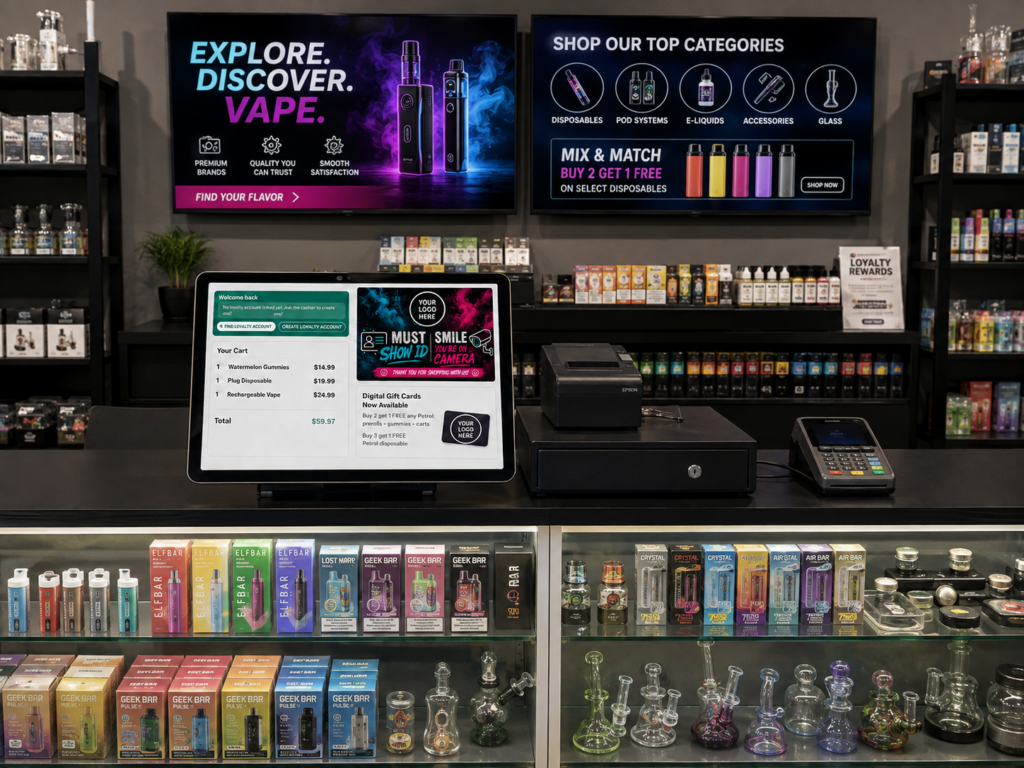
Run checkout, inventory, loyalty, employee management, marketing, online ordering, and multiple locations through one connected vape shop POS system.
Acadia POS helps vape and smoke shops organize thousands of products, flavors, brands, sizes, nicotine strengths, and barcodes without slowing down checkout.
You control your hardware, your customer-facing screen, your promotions, and your customer relationships.
[Request a Vape Shop POS Demo]
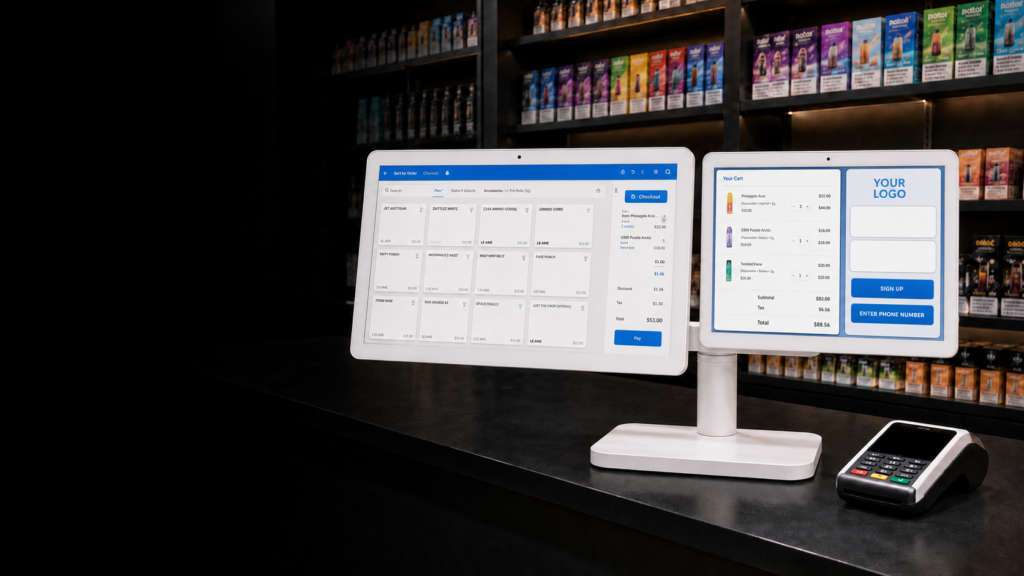
A POS System Designed Around How Vape Shops Actually Operate
Generic retail software struggles with vape inventory.
A single product line may include multiple flavors, sizes, nicotine strengths, package quantities, and device variations. Similar products may share barcodes. Cases and individual units have different UPCs. Certain products may require different payment rules.
Acadia POS gives vape retailers the flexibility to organize and sell these products without forcing every item into a rigid inventory structure.
Use one platform to manage:
- In-store checkout
- Age verification
- Products and variants
- Multiple and duplicate barcodes
- Inventory waste
- Brands
- Categories and subcategories
- Loyalty rewards
- Text-message marketing
- Customer-facing displays
- Employee timekeeping and scheduling
- Digital menu boards
- Online ordering
- Delivery and pickup
- Purchase orders
- Inventory transfers
- Multiple stores and warehouses
- Payment-method restrictions
- Reporting and analytics
Acadia’s existing vape-shop platform supports multi-location management, age verification, loyalty, brand management, online sales, employee management, offline operation, and real-time reporting.
Limited Free POS Hardware Offer
For a limited time, qualifying vape shops can purchase the required chip reader and Acadia Router and receive a complete approved POS setup without an additional upfront charge for the qualifying POS hardware.
Your configuration may include:
- Touchscreen POS station
- Customer-facing display
- Barcode scanner
- Receipt printer
- Cash drawer
- Payment terminal
- Acadia Router
- Required cables and mounting equipment
Final equipment, eligibility, software pricing, processing requirements, and offer terms depend on the approved configuration.
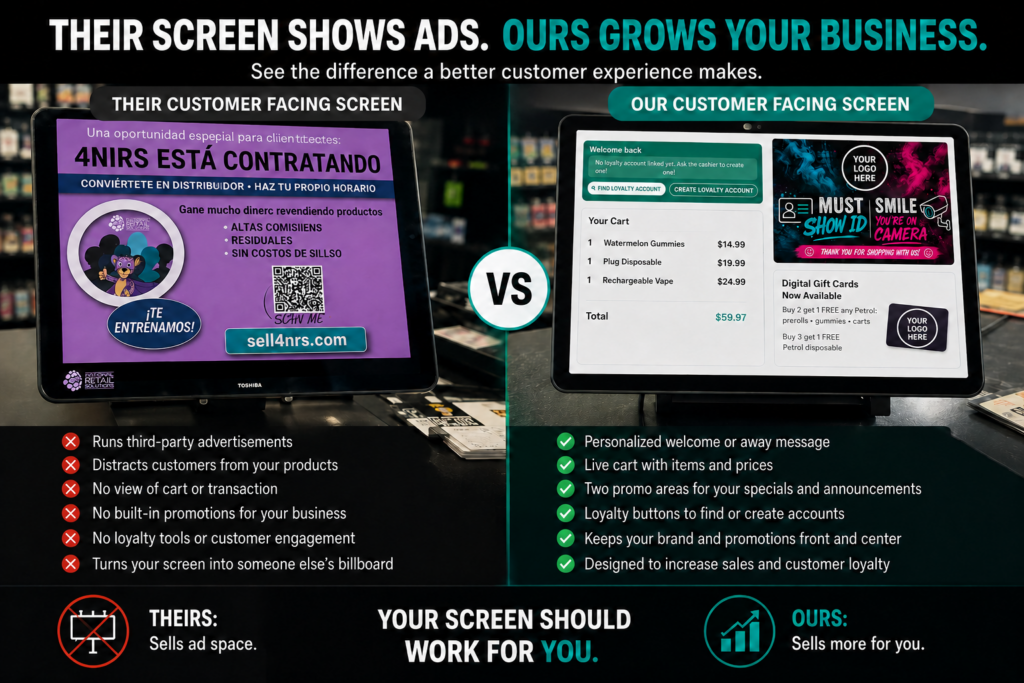
A Customer-Facing Display That You Control
Your customer-facing screen should promote your vape shop, not someone else’s products and services.
Some POS providers use merchant-owned counter space to advertise their own payroll, insurance, financing, or other services. That turns your checkout counter into their sales channel.
Acadia gives you control over what your customers see.
Use the display to show:
- Products in the cart
- Prices and totals
- Loyalty enrollment
- Reward balances
- Store branding
- Current promotions
- New arrivals
- Featured products
- Customer messages
- Payment information
Your screen stays focused on your business and your customers.
Inventory Built for Vape Products, Flavors, Sizes, and Variants
Vape inventory becomes a mess when the POS cannot distinguish between similar products.
Acadia POS allows you to organize products using detailed attributes such as:
- Brand
- Product line
- Flavor
- Device type
- Size
- Nicotine strength
- Package quantity
- Disposable or refillable
- Location
- Supplier
- Category and subcategory
Instead of creating a flat, unmanageable product list, you can structure inventory around the way employees and customers naturally search for products.
Unlimited Categories and Nested Subcategories
Create as many categories and subcategories as your store needs.
For example:
Disposable Vapes
- Brand
- Product line
- Flavor
- Nicotine strength
- Device size
- Flavor
- Product line
E-Liquids
- Salt nicotine
- Freebase
- Zero nicotine
- Bottle size
- Flavor family
Hardware
- Pod systems
- Mods
- Tanks
- Coils
- Batteries
- Chargers
This makes inventory easier to search, report on, reorder, and manage across locations.
Brand Management
Manage products by brand instead of relying on inconsistent product names.
Brand-level organization helps you:
- Search inventory faster
- Review sales by manufacturer
- Create brand-specific promotions
- Generate purchase orders
- Compare brand performance
- Identify slow-moving product lines
- Apply price rules
- Track inventory across multiple stores
Acadia also supports location-specific and brand-specific pricing rules.
Assign Multiple Barcodes to One Product
The same product may arrive with different barcodes depending on the package, supplier, production run, or case quantity.
Acadia allows you to assign multiple barcodes to one product.
For example:
- One barcode for an individual unit
- Another barcode for a five-pack
- Another barcode for a full display box
- An older manufacturer barcode
- A replacement barcode from a different supplier
Scanning any approved barcode brings up the correct product and inventory record.
Acadia supports multiple additional barcodes and can associate box quantities with case-level barcodes.
Duplicate Barcode Support
Some vape products use the same barcode across products that differ by size, flavor, nicotine strength, or package configuration.
That creates a serious inventory problem for ordinary retail systems.
When Acadia detects a barcode associated with more than one item, the cashier can see the available options and choose the correct product being sold.
This helps the store:
- Charge the correct price
- Reduce checkout mistakes
- Track the correct size or variation
- Maintain accurate inventory
- Avoid assigning sales to the wrong item
- Improve product-level reporting
The employee does not have to manually search through the entire inventory catalog every time a duplicate barcode appears.
A Waste Button for Broken, Leaking, Expired, or Unsellable Products
Damaged vape inventory should not remain available for sale inside the POS.
Employees can use the waste function to remove unsellable products from active inventory while creating a record of what happened.
Use it for:
- Leaking disposable devices
- Broken glass
- Damaged packaging
- Defective hardware
- Expired products
- Returned products that cannot be resold
- Missing or compromised inventory
- Tester Items
This gives managers a more accurate inventory count and a clearer record of losses.
Acadia’s waste feature removes broken, expired, or otherwise unsellable products from inventory.
Free In-House Loyalty Program
Stop paying a separate company to operate a basic rewards program.
Acadia includes an in-house loyalty platform that allows your store to create flexible rewards based on customer activity.
You can reward customers using:
- Points per dollar
- Purchase frequency
- Product categories
- Specific products
- Customer groups
- Spending thresholds
- Store locations
- Custom promotional rules
Customers can enroll at the customer-facing display, and employees can locate accounts using identifying information such as the customer’s phone number.
Acadia provides loyalty and rewards features as part of the POS platform without a separate loyalty-platform fee.
Text Marketing Built Around Customer Consent
Acadia’s loyalty and marketing tools help vape shops collect customer information and build targeted SMS campaigns.
Use customer purchasing data to create campaigns based on:
- Products previously purchased
- Favorite brands
- Average spending
- Last visit
- Shopping frequency
- Store location
- Loyalty status
- Time since the last transaction
You can create:
- New-product announcements
- Customer win-back campaigns
- Loyalty-reward notifications
- Store-event promotions
- Product-specific offers
- Birthday promotions
- Location-specific messages
The campaign platform, customer segmentation, content creation, image storage, and landing-page tools are included with the applicable POS subscription. Message-delivery charges apply when texts are sent.
AI-Generated Promotional Landing Pages
A text message has limited space. and we’re limited to what can be messaged. Carriers don’t want businesses marketing “SHAFT” related content through sms.
Acadia allows your store to connect a campaign to a dedicated promotional landing page.
Use AI-assisted tools to create pages for:
- New product releases
- Featured brands
- Loyalty offers
- Store events
- Limited-time promotions
- New-location announcements
- Product education
- Online ordering
The platform can help generate written content, build the promotional page, host uploaded images, and give customers one clear place to view the offer.
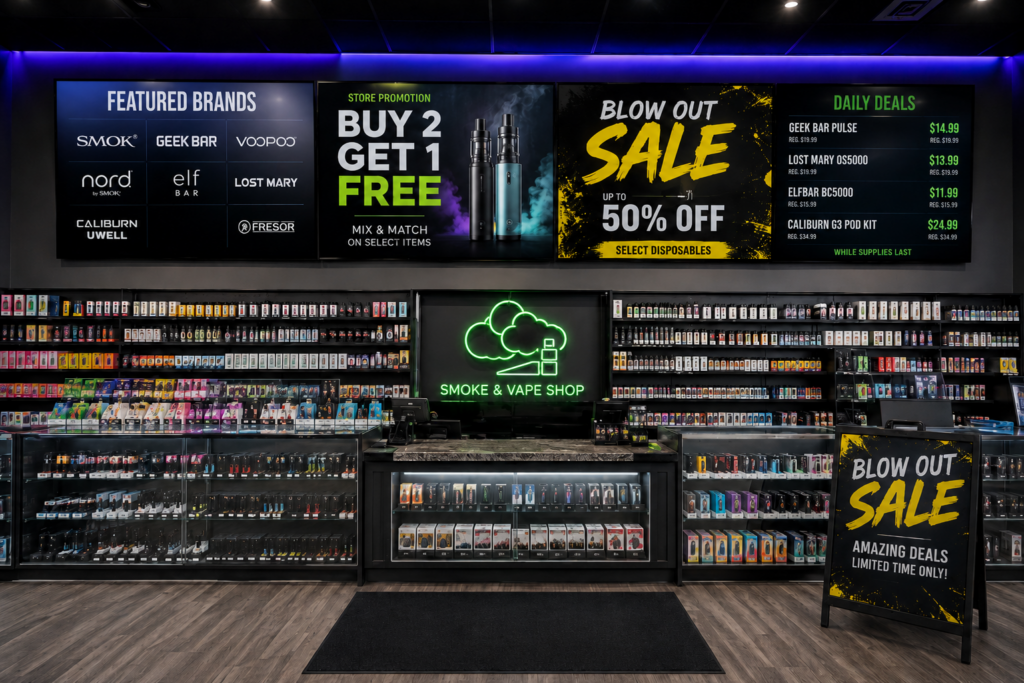
Free Digital Menu Boards
Turn the televisions inside your store into promotional screens that you control.
Acadia’s digital menu board software can display:
- New arrivals
- Featured brands
- Current promotions
- Loyalty offers
- Store policies
- Product categories
- Cash and card prices
- Upcoming events
- Educational content
- Custom graphics and videos
When a price or product changes in the POS, the digital display can update without requiring employees to recreate printed signs.
The digital-menu software is included without a separate platform charge and works with compatible HDMI displays.
Online Ordering for Pickup or Delivery
Give customers a way to shop outside the store.
Acadia’s optional e-commerce platform can synchronize online products, inventory, orders, and customer data with the POS.
Customers can place orders for:
- In-store pickup
- Local delivery where legally permitted
- Scheduled fulfillment
- Available online products
Your employees can manage online and in-store activity through one connected system instead of manually updating two separate inventories.
Online availability, age-verification procedures, delivery rules, shipping restrictions, and product eligibility must follow federal, state, local, carrier, and payment-provider requirements.
Acadia Ecommerce supports online ordering, pickup, delivery workflows, and synchronized inventory as an optional paid platform.
Employee Time, Attendance, and Scheduling
Manage employee activity inside the same platform used to run the store.
Acadia can help track:
- Clock-in and clock-out times
- Employee hours
- Timesheets
- Store location
- Pay rates
- Scheduled shifts
- Attendance
- Employee sales
- Register activity
- Permissions
- Manager access
Multi-Location Vape Shop Management
Run one store or an entire chain from a centralized account.
Managers can review and control:
- Sales by location
- Inventory by location
- Employees
- Customers
- Loyalty accounts
- Brands
- Product pricing
- Purchase orders
- Transfers
- Warehouses
- Online orders
- Reporting
You can manage store-level operations without logging into a separate system for every location.
Transfer Inventory Between Locations
Move products from one store to another without losing track of them.
Transfers can help when:
- One location runs low
- Another store has excess stock
- A new store is opening
- Products sell at different rates by neighborhood
- A promotion creates unexpected demand
- Inventory belongs in a central warehouse
The system records what left one location and what arrived at another, giving managers better visibility than informal text messages or handwritten transfer sheets.
Acadia supports location-based inventory, transfers between locations and multilocation purchase orders. When a purchase arrives at the first location and is checked in, a transfer order is automatically created for any other destinations.
Purchase Orders for One or Multiple Locations
Create purchase orders based on current inventory and low-stock reports.
Managers can:
- Review low-stock products
- Select the supplier
- Choose the receiving location
- Select a warehouse
- Adjust order quantities
- Send the purchase order
- Track outstanding products
- Receive products individually
- Receive the entire shipment
- Update inventory after receiving
Multi-location purchase orders allow a business to organize supplier orders for several stores while maintaining location-level inventory records.
IMAGE PLACEHOLDER: Vape shop purchase-order workflow showing low-stock products, supplier selection, multi-location quantities, receiving, and updated inventory
Cash-Only and Restricted Payment Products
Payment rules for vape products continue to change.
Acadia allows merchants to designate selected products for approved payment methods, including cash-only configurations when required by the merchant’s processor, acquirer, or compliance program.
This can help prevent an employee from accidentally accepting a restricted card type for a designated item.
The system can provide a clear checkout prompt explaining that the product requires another approved payment method.
A Cash-Only Setting Does Not Make an Unlawful Product Legal
Payment controls do not replace legal review.
A product can still violate federal, state, or local law even when the customer pays with cash. A processor may also prohibit the merchant from selling certain products regardless of the payment method.
Use this feature as one layer of a written compliance program, not as a magic loophole.
Mastercard, FDA Guidance, and a Changing Enforcement Environment
FDA issued updated enforcement-priority guidance in May 2026 covering certain unauthorized ENDS and nicotine-pouch products. The guidance describes circumstances in which FDA may deprioritize enforcement, including certain products connected to accepted and pending applications. It does not constitute marketing authorization, and FDA states that guidance documents do not create legally enforceable rights or responsibilities.
Retailers should not assume that FDA enforcement discretion automatically binds Mastercard, Visa, an acquiring bank, or a payment processor.
Recent reports indicate that Mastercard and major processors continue warning merchants and acquirers about transactions involving unauthorized vape products.
If your processor or acquirer provides a written temporary exception, pause, or product-specific policy, follow that written direction. Do not rely on rumors, screenshots, or another store’s interpretation.
Acadia’s product-level tender controls give merchants flexibility to follow the payment program approved for their specific account.
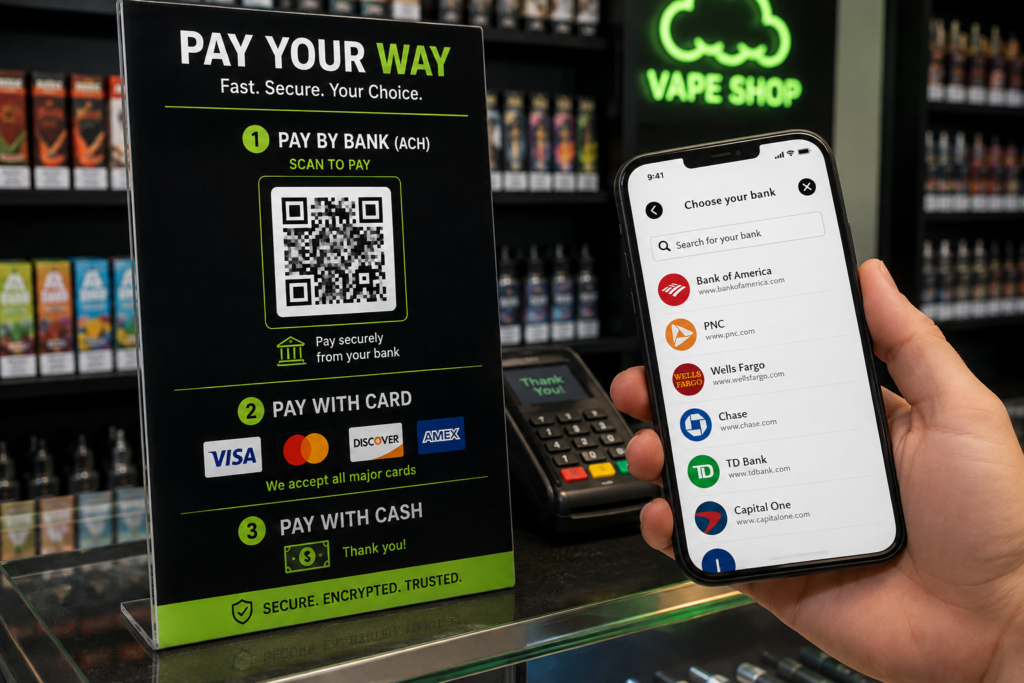
QR Pay by Bank
Give customers another legitimate electronic-payment option that does not rely on a credit-card network.
With Pay by Bank, the customer scans a QR code and authorizes an account-to-account payment from a bank account.
Depending on the approved provider, Pay by Bank may offer:
- QR-code checkout
- Direct bank authorization
- Mobile-first payment
- Reduced dependence on credit-card networks
- Electronic transaction records
Pay by Bank uses ach payment rails, thus side-stepping the oversight of card brands
Age Verification at Checkout
Age verification should form part of the normal checkout workflow rather than depend entirely on employee memory.
Acadia can prompt employees to complete the required age check for designated products.
Keep Selling When the Internet Goes Down
Acadia combines local operation with cloud management.
The POS can continue operating locally during an internet interruption, while the Acadia Router keeps stations communicating. Its available cellular failover can help keep payment processing connected when the primary internet service fails.
Reporting That Helps You Make Better Decisions
Review the information that matters without rebuilding reports in spreadsheets.
Acadia reporting can help identify:
- Best-selling brands
- Best-selling flavors
- Slow-moving products
- Waste and damaged products
- Low-stock products
- Sales by employee
- Sales by store
- Sales by product
- Sales by category
- Customer purchase behavior
- Payment-method trends
- Inventory transfers
- Purchase-order activity
- Online orders
- Promotion performance
The goal is not to flood you with dashboards.
The goal is to show you what needs attention.
White-Glove Setup and Support
Changing POS systems sounds painful when you imagine doing it alone.
Our job is to make the transition manageable.
1. Business Review
We review your:
- Existing POS
- Store locations
- Inventory
- Brands
- Barcodes
- Product variants
- Employees
- Payment requirements
- Loyalty program
- Online ordering
- Hardware
- Compliance workflows
2. Inventory Import
Our team helps import and organize your product database.
This may include:
- Product names
- SKUs
- Barcodes
- Multiple barcodes
- Brands
- Categories
- Subcategories
- Prices
- Costs
- Suppliers
- Location quantities
- Product attributes
3. System Configuration
We configure the system around your vape shop instead of giving every merchant the same generic retail setup.
4. Hardware Installation
We connect and test the approved:
- POS terminal
- Customer-facing display
- Scanner
- Receipt printer
- Cash drawer
- Payment device
- Acadia Router
- Additional stations
5. Employee and Manager Training
Cashiers learn checkout, loyalty enrollment, barcode selection, age prompts, waste, and payment procedures.
Managers learn inventory, reporting, purchase orders, transfers, marketing, employee management, and multi-location controls.
6. Launch and Ongoing Support
Our team assists with launch, configuration questions, employee support, payment-device setup, and future expansion.
One System for Your Entire Vape Shop
Acadia POS brings together:
- Checkout
- Age verification
- Inventory
- Multiple barcodes
- Duplicate barcode selection
- Waste tracking
- Brands
- Categories and subcategories
- Loyalty
- Text marketing
- AI-generated landing pages
- Customer-facing displays
- Digital menu boards
- Employee timekeeping
- Scheduling
- Online ordering
- Delivery and pickup
- Purchase orders
- Inventory transfers
- Multi-location reporting
- Cash-only product controls
- QR Pay by Bank
- Ongoing support
Your POS should help run your business.
It should not use your counter to sell someone else’s services.
See Acadia POS in Action
Schedule a personalized demonstration based on your current store, inventory, locations, and payment requirements.
Frequently Asked Questions
Does Acadia POS support age verification?
Yes. Designated products can trigger an age-verification workflow at checkout. Merchants remain responsible for following applicable laws and configuring the approved verification process.
Can one product have multiple barcodes?
Yes. A product can have several associated barcodes, including separate barcodes for cases and individual units.
What happens when two products share the same barcode?
The POS can display the matching product options so the employee can select the correct size, flavor, or variation.
Can employees remove damaged products from inventory?
Yes. The waste function can remove leaking, broken, expired, or otherwise unsellable products while maintaining a record of the adjustment.
Is loyalty included?
Yes. Acadia provides an in-house loyalty and rewards system without a separate loyalty-platform fee.
Does text marketing cost extra?
The marketing platform, segmentation tools, landing-page creation, content tools, and image storage are included with the applicable subscription. Usage-based text-delivery charges apply.
Are digital menu boards included?
The digital-menu software is included without a separate platform fee. Compatible screens and required hardware may still be needed.
Can customers order online?
Yes. Acadia Ecommerce is an optional platform supporting synchronized online ordering, pickup, and available delivery workflows.
Can the system manage multiple stores?
Yes. Acadia supports location-level inventory, transfers, employees, reporting, purchase orders, customers, and pricing.
Can products be restricted to cash or another payment method?
Yes. Selected products can be assigned approved payment restrictions. These settings must follow the merchant’s processor, acquirer, and legal requirements.
Does Acadia support Pay by Bank?
Approved QR-based Pay-by-Bank solutions can provide an account-to-account payment alternative. Availability depends on the merchant, provider, products, and underwriting approval.
Does Acadia offer cashless ATM processing?
We recommend properly approved Pay-by-Bank payments rather than disguising retail purchases as ATM withdrawals.
Will cash-only settings eliminate Mastercard compliance risk?
No. A cash-only setting prevents a designated Mastercard transaction, but it does not legalize a prohibited product or override the merchant agreement.
Does the POS work without internet?
The retail POS can continue operating locally, while the Acadia Router can provide station synchronization and available cellular failover for payment connectivity.